
- Key Takeaways
- Do You Need to Register Your Drone?
- Weight Matters
- Basic Requirements for Drone Registration
- The Purpose Rule — Recreational vs. Commercial
- Special Cases
- Audience Profiles
- “Should I Register?” Flowchart
- Registration Pathways Side-by-Side
- Common Myths
- How to Register Step-by-Step (FAADroneZone)
- Create Your FAA Account
- Choose Your Account Type
- Enter Owner & Drone Details
- Pay, Download Certificate, Label Your Drone
- What to Carry on Every Flight
- Remote ID and Registration — The New Pair
- Why Remote ID Exists
- Three Ways to Comply
- How Registration Links to Remote ID
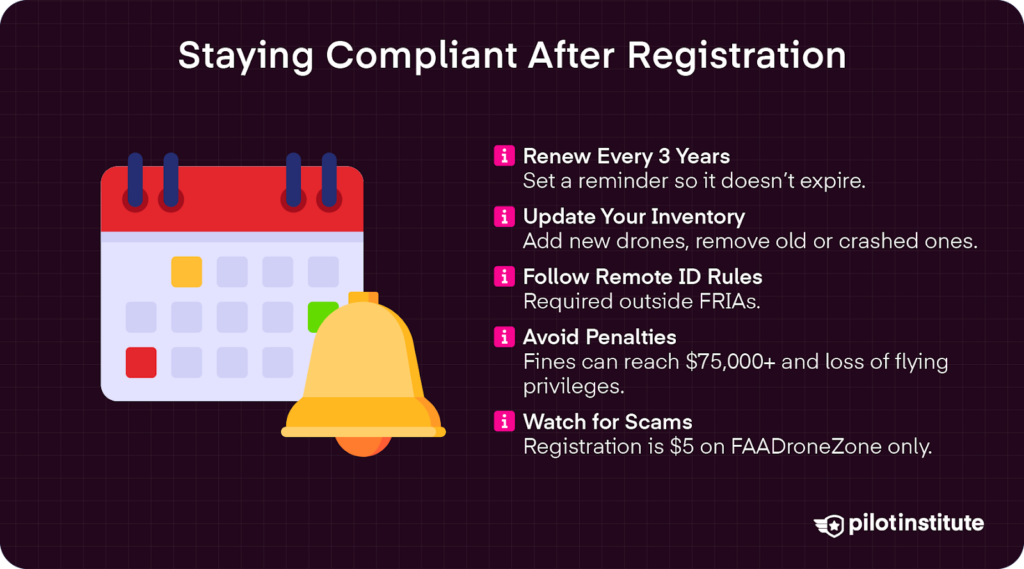
- Staying Compliant After Registration
- Renewal Every 3 Years
- Updating Your Inventory
- Enforcement and Penalties for Non-Compliance.
- Penalties for Non-Compliance
- Scams to Avoid
- Frequently Asked Questions
- Conclusion
Did you know that your drone is legally considered an aircraft? Under U.S. law, that classification comes with real responsibilities.
Much like owning a car requires registration and a license plate, flying a drone does too. That means before you take to the skies, you may need to register your drone with the FAA.
The FAA is ramping up enforcement with the coming of Part 108. It can also levy fines up to $75,000!
Let’s look at whether or not you need to register your drone to avoid costly fines. Then, we’ll walk you through the steps to make the registration process nice and easy.
Key Takeaways
- Learn whether or not you need to register your drone.
- Know the difference between recreational and commercial registration to figure out which pathway is right for you.
- Walk through the registration process step by step.
- Understand how to stay compliant with new Remote ID regulations.
Do You Need to Register Your Drone?
Weight Matters
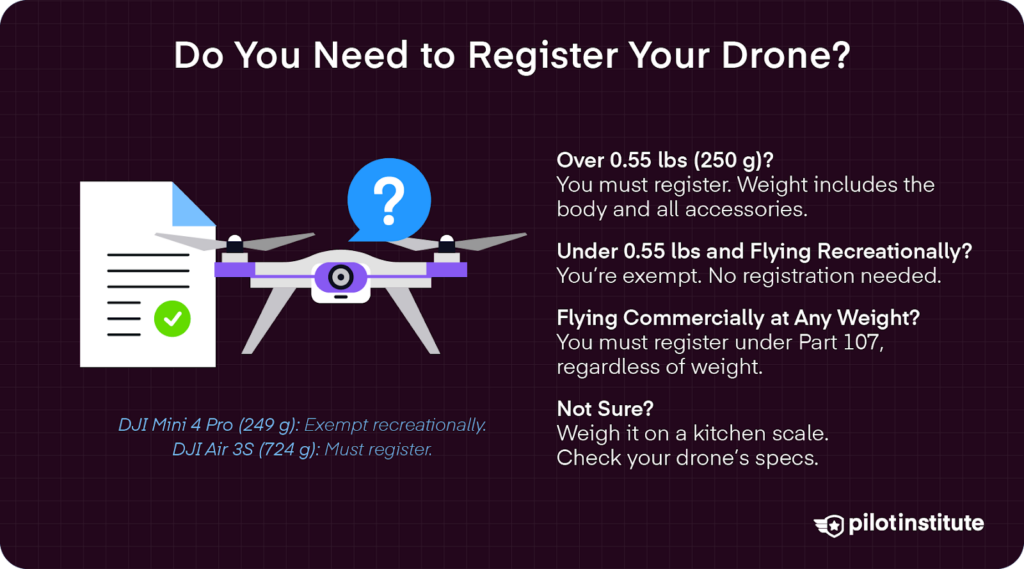
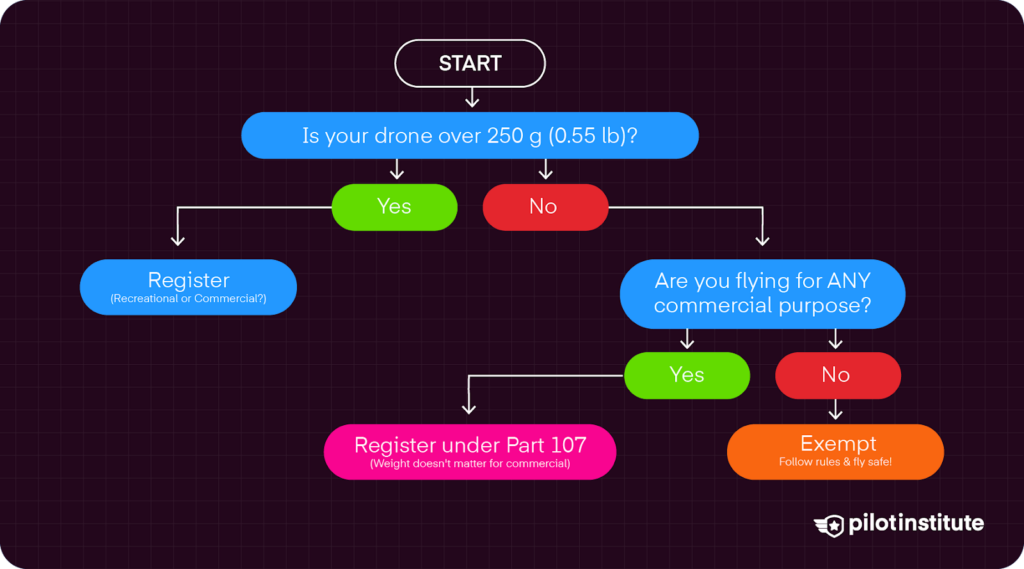
Simply put, if your drone weighs more than 0.55 lbs (250 grams), you have to register it.
That weight includes the drone body and any accessories, such as cameras or propeller guards. Not sure exactly how heavy your drone is? Well, weigh it! A simple kitchen scale will do the trick.
Popular 2025–2026 models for context:
| Drone | Weight | Registration needed (Recreational)? |
|---|---|---|
| DJI Mini 4 Pro | 0.549 lbs (249 g) | No |
| DJI Air 3S | 1.6 lbs (724 g) | Yes |
| DJI Mavic 3 Pro | 2.11 lbs (958 g) | Yes |
| DJI Avata 2 | 0.831 lbs (377 g) | Yes |
| DJI Neo | 0.298 lbs (135 g) | No |
Basic Requirements for Drone Registration
- Must be a U.S. citizen or legal permanent resident (foreign nationals visiting the U.S. use the same process to receive a “recognition of ownership”).
- Must be 13 years of age or older.
- Must have a valid email address.
- Must have a physical mailing address.
- Must have a credit or debit card for the $5 fee.
The Purpose Rule — Recreational vs. Commercial
Recreational
The FAA defines recreational flight as flying “purely for fun or for personal enjoyment.” This includes all you hobbyists who enjoy flying just for the fun of it.
You can fly recreationally in Class G airspace, up to 400 feet from the ground you are standing on (400 feet AGL).
It is still important to follow all airspace restrictions. So, don’t fly in controlled or restricted airspace without proper authorization. Always check what airspace you are in and for any Temporary Flight Restrictions (TFRs) that may impact your flight.
Recreational pilots do not need to register drones weighing less than 0.55 lbs (250 g) or less. Pilots flying heavier drones must register their drones.
The FAA requires recreational pilots to pass the Recreational UAS Safety Test (TRUST). This is a short online course to help hobbyists understand basic safety rules and airspace regulations.
Fortunately, we here at Pilot Institute are an FAA-approved Test Administrator of the TRUST exam. We offer an easy pathway to take the test for free in just four short quizzes. That means you can have your TRUST Certificate in as little as 30 minutes!
Commercial
Flying to make some cash? Maybe you’re a photographer who wants to sell amazing aerial shots or a real estate agent using a drone to capture sweeping views of a property. Either way, once money is involved, you are flying commercially.
Let’s say you aren’t making any money directly from flying your drone. That should mean it falls under recreational, right? Well, not exactly.
It isn’t just big business or selling aerial photography. The FAA still considers certain activities non-recreational, like posting drone videography on a monetized YouTube channel, inspecting roofs, spraying a crop field, or even volunteering for Goodwill or other nonprofit organizations.
Commercial flights fall under the rules of 14 CFR Part 107. Flying under Part 107 requires you to take the test for your Remote Pilot in Command Certification. Tests are conducted in person at FAA-approved Knowledge Testing Centers.
Lucky for you, we offer Part 107 Made Easy, a comprehensive course with tons of practice exams and quizzes to ensure you pass the test. An incredible 99.9% of our students pass!
Part 107 pilots must register their drones, “regardless of weight.” The weight exemption only applies to recreational flying.
Special Cases
Drones over 55 lbs cannot be registered online. Instead, you have to register under what is known as the Part 47 process, typical of most manned aircraft. You will need to submit Form AC 8050-1 to the FAA Aircraft Registration Branch. Upon approval, you will receive an N-number, like the tail numbers on airplanes and helicopters.
For foreign nationals who want to operate a drone in U.S. airspace, you follow similar registration steps with the FAADroneZone website. The certificate is considered “a recognition of ownership,” rather than a U.S. drone registration. Foreign drone operators are still required to comply with Remote ID regulations and fly according to FAA airspace rules.
Audience Profiles
Not sure where you stand? Let’s look at some examples.
| Profile | Example | Which rules apply? |
|---|---|---|
| Weekend Hobbyist | Flying a Mini 4 Pro at the park on a Saturday. | Recreational flyer. Does not need to register, unless the drone weighs 0.55 lbs (250 g) or more. Follow standard FAA flight rules (VLOS, Stay below 400 feet AGL in Class G airspace, give way to manned aircraft). |
| Aspiring Commercial Pilot | Shooting real estate photos, roof inspections, and LiDAR mapping for commercial purposes. | Part 107 pilot. Must register, regardless of the drone’s weight. Follow standard FAA flight rules. Tip: While not mandatory, it is highly recommended to carry drone insurance. |
| Foreign Visitor | Vacation footage in U.S. airspace | Recreational flyer. Must file registration and receive a “recognition of ownership” certificate. Follow standard FAA flight rules. |
“Should I Register?” Flowchart
Registration Pathways Side-by-Side
| Feature | Recreational (Exception for Limited Recreational Operations) | Part 107 (Commercial) |
|---|---|---|
| Fee | $5 | $5 |
| Remote ID Entry | Required | Required |
| Knowledge Requirement | TRUST Certificate | Remote Pilot Certificate |
| Valid For | 3 years | 3 years |
| Examples of Allowed Missions | Personal aerial photography and videography. Practice flying skills. Exploring landscapes for enjoyment. Hobby flying. | Aerial Photography for Real Estate Marketing. Commercial film production. Roof and building inspections. Land surveys and field mapping. Crop monitoring, seeding, and spraying. Filming a charity event as a volunteer for a nonprofit organization to use on its website. |
Still not sure which pathway to choose? The FAA’s “What Kind of Drone Flyer Are You” survey is a great tool to help you get more clarity.
Common Myths
- Myth: Flying under 400 feet AGL means I don’t need to register my drone.
Fact: Altitude has nothing to do with registration. The reason you are flying and the weight of your drone determine whether you need to register or not.
- Myth: I activated my drone in the DJI Fly app, so I am already registered with the FAA.
Fact: DJI activation is with the manufacturer, not with the FAA.
- Myth: My drone is under 250 g, so I won’t need to register it.
Fact: If you are flying recreationally, this is correct. However, the moment you fly for any commercial purpose, you must register it under Part 107, regardless of weight.
How to Register Step-by-Step (FAADroneZone)
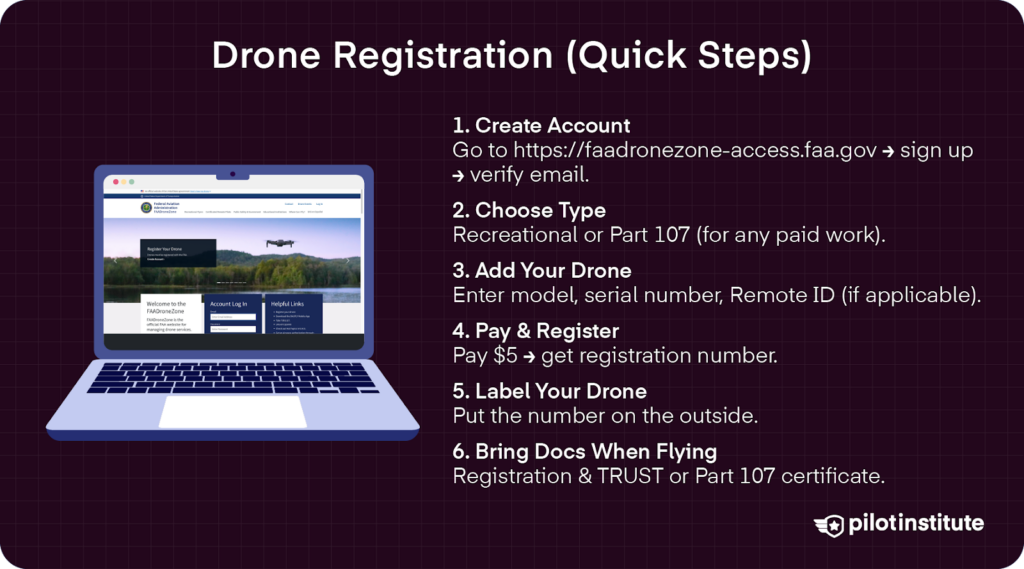
So, you need to register your drone. What’s next? Admittedly, the FAA’s process can feel like a lot, but it’s actually quite easy. Let’s walk through the steps.
Create Your FAA Account
Go to faadronezone-access.faa.gov. If you see a yellow “FAADroneZone System Notification,” just click the X in the right-hand corner.
On the main page, click “Create an Account.” Browse through the terms and conditions of the “System Use Notice” and then click “I Agree.”
Fill out the required fields and create your user password.
- Tip: Use a personal email that you check regularly. Government and corporate email filters can block FAA confirmation emails.
- Tip: Always check your spam folders in case FAA emails end up there.
Click “Create Account.” You will receive a confirmation email to verify your email address. Click the link in the email to log in and finalize your account setup and finish your user profile.
Choose Your Account Type
Once you log in, click on the “Launch Drone Owners and Pilots Dashboard” link at the bottom of the left box. Your dashboard is where you can see an inventory of your devices (drones) and Part 107 users (if you choose to register under Part 107).
On the “UAS Operator: Account Types” page, select your account type. Select “Set Up Recreational Flyer” to fly under the Exception for Recreational Flyers.
You can choose to use your existing profile information (phone number, mailing address, etc), or re-enter new profile information. Make sure all personal information is entered and correct, then click “Proceed to Checkout.”
On the “Acknowledgment of Safety Guidance” page, read over the requirements for flying recreationally. Click “I have read and understand the safety guidance,” then click “Next.”
Select “Fly sUAS under Part 107” if you plan on flying commercially. You can use your individual or company information (if you have one). Click to “Proceed to Checkout.”
- Tip: If you think you may do any sort of paid work at all, just choose the Part 107 path. You can always have both types under one login.
Enter Owner & Drone Details
You will be redirected to “Your Inventory Page,” where you can click “Add Device.” If you are not, you can go back to the Dashboard. Under “Inventory,” click “Manage Device Inventory.”
A pop-up window will open asking whether your drone complies with RemoteID regulations. If so, select yes. You will be asked to validate your RemoteID serial number. If not, it will automatically take you to the next step.
- Tip: Your Remote ID serial number can typically be found in your drone’s app. For example, in the DJI Fly app, you can find your RemoteID serial number by clicking the three dots in the upper left corner and selecting “About.” Scroll all the way down to find your Remote ID SN.
Next, enter your device’s information. This includes selecting the device type, giving it a nickname, and including the manufacturer and UAS model.
- Tip: For most consumer drones, the serial number is typically located on a sticker near the battery. You can also find it in the “About” section described above. For brand new drones, the serial number should be marked on the box.
- Tip: For newer DJI drones, the serial numbers are often the same as the RemoteID serial numbers.
Exit out of the “Add Device” window to return to your shopping cart.
Pay, Download Certificate, Label Your Drone
Navigate to the shopping cart icon in the right-hand corner of the screen. Click “Check Out.”
Read the “Acknowledgement of FAA Requirements,” then select “Next.”
Input your payment information (credit or debit card) and pay the $5 fee by clicking “Next.”
You’ll receive an FA registration number instantly (format: FA + set of numbers).
- Tip: Download the PDF certificate immediately! Then save it to your phone and print a copy so that it is easy to access in the field.
Next, you have to mark your FAA registration number on your drone’s body. The number must be on an external surface, clearly visible without using any tools.
- Tip: You can do this for free with a permanent marker. While free, this can fade.
- Tip: We are offering free registration stickers! Enroll with Pilot Institute, and we will ship the first 10,000 users free FAA registration stickers.
Still unsure? Want a more visual walkthrough of the drone registration process? Check out our video explaining it all.
What to Carry on Every Flight
Carry your registration certificate when you head out to fly. Carry a PDF copy on your phone or tablet, plus a paper backup in a zip-lock bag to keep it safe from water and weather. Also, bring your TRUST certificate (recreational) or Part 107 Remote Pilot Certificate (commercial).
It’s good to have any LAANC authorizations or waiver paperwork for the specific operation. LAANC authorizations allow drone pilots to fly under 400 feet AGL in controlled airspace, like around airports. You can submit an LAANC request with apps like Aloft. You basically give information on the date/time/desired altitude of your operation. If approved, you will receive a maximum altitude ceiling for that date and time.
Remote ID and Registration — The New Pair
Why Remote ID Exists
The skies are buzzing with more drones than ever before. From 2016 to 2025, there were over 965,524 commercial drones registered. There were over 124,000 commercially registered in 2024 alone!
There will only be more with the coming of Part 108, which streamlines beyond visual line of sight (BVLOS) for automated drone operations.
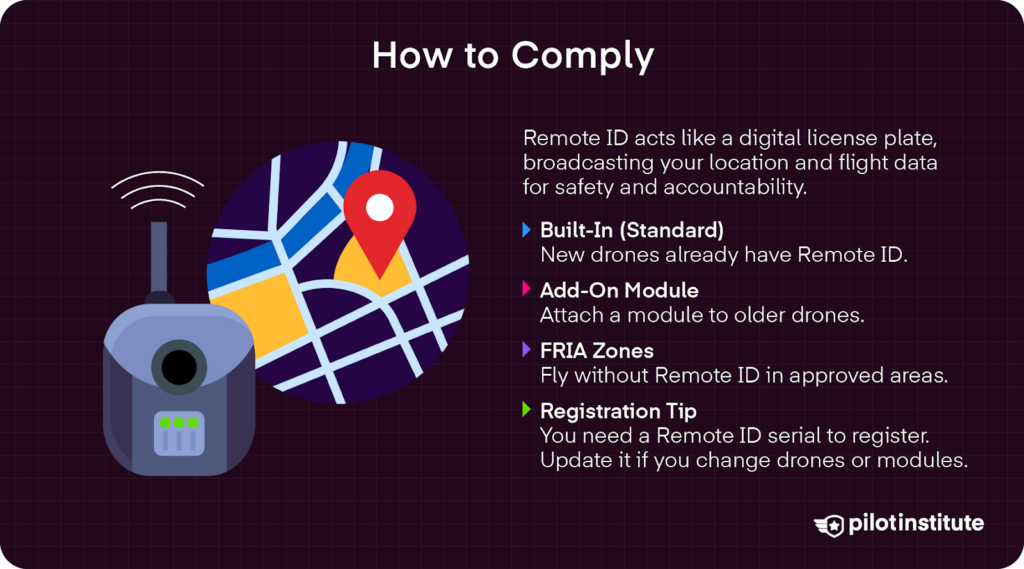
With all this extra drone traffic, the FAA has stepped up its management of the national airspace. Your Remote ID is like a digital license plate for your drone. It broadcasts your Remote ID serial number, latitude, longitude, altitude, velocity, and takeoff location.
When you’re flying, your Remote ID pops up on real-time airspace maps to let others know you’re in the area.
Remote ID also makes pilots more accountable for where and how they fly. It helps the FAA track drones flying recklessly or where they shouldn’t be.
Three Ways to Comply
| Method | What It Is | Who It’s For | Approx. Cost |
|---|---|---|---|
| Standard Remote ID (Built-In) | The Remote ID broadcast module is built into the drone by the manufacturer. | Pilots in the market for newer drones that are already Remote ID compliant. Beginners buying their first drones. | Part of the drone purchase price. |
| Broadcast Module (Add-On) | A separate Remote ID module that is retrofitted to an existing drone. | Drone owners who do not want to purchase new equipment but need to stay compliant. Hobbyists who build their own drones and need to add a Remote ID-compliant module. | $35 (Ruko R111/R111S) - $120 (BlueMark DB121) - $325+ (DroneTag Mini)*Prices are accurate as of March 2026. |
| FRIA (FAA-Recognized Identification Area) | These are designated areas where you can fly your drone without any Remote ID equipment. FRIAs can be found by searching the FAA’s UAS Data Delivery System. To fly, you must stay within the boundaries of the FRIA and maintain a visual line of sight (VLOS). | For those who own a drone without Remote ID and don’t want to retrofit their equipment with an aftermarket module. This could be pilots who build drones from scratch who want to test their designs, or hobbyists who have an old drone and don’t want to spend the money updating it for compliance. | Free. |
Not sure if your equipment is Remote ID compliant? You can verify drone models and broadcast modules by searching on the FAA’s UAS Declaration of Compliance Search.
How Registration Links to Remote ID
FAADroneZone now requires you to enter a Remote ID serial number during registration. You can’t complete the registration process without one, so make sure you have that squared away before starting.
If you swap broadcast modules or get a new drone, you must update your inventory in FAADroneZone.
You can also move a broadcast module between drones in your Inventory List. Recreational flyers can adjust as needed to save on purchasing multiple broadcast modules for older equipment.
However, Part 107 registrants must register each device individually.
Staying Compliant After Registration
Renewal Every 3 Years
Unfortunately, registration is not for life. You do have to renew your registration every three years. This goes for both recreational and Part 107 flyers.
The FAA does send renewal notices by email. Yet, these can land in spam folders.
Tip: Make sure your registration doesn’t lapse. Set a calendar reminder for 30 days prior to expiration.
Updating Your Inventory
You also have to update your inventory on FAADroneZone when purchasing a new drone or selling an old one.
In the unfortunate event you experience a crash, you’ll have to delete the device from your inventory. RIP. But, do keep the serial number handy for your insurance claims!
Enforcement and Penalties for Non-Compliance.
The discretionary enforcement of Remote ID officially ended on March 16, 2024. That means in 2026, all pilots flying in national airspace (outside of designated FRIAs) must be Remote ID compliant.
Penalties for Non-Compliance
Not complying can result in fines. The FAA Reauthorization Act increased potential fines for unauthorized drone operations to up to $75,000 per violation.
And the FAA is not kidding around. From 2022 to 2024, it proposed $343,413 in civil penalties to 27 pilots who broke federal drone regulations.
A prime example comes from a case in 2022. Someone flew an unregistered drone over the Miami Grand Prix Formula 1 event, ignoring registration requirements and a TFR. The FAA responded with a hefty $18,200 fine.
There are also potential criminal penalties. Under 49U.S.C. § 46306, drone pilots who fail to register their drones before flying can be fined or face up to three years’ imprisonment.
You can even lose the privilege to fly your drone in national airspace. The FAA can suspend or revoke your Remote Pilot Certificate.
Scams to Avoid
Registration is a lot easier and cheaper than you think. All it takes is $5 and a few minutes of your time. Don’t fall for third-party “expeditor” sites charging $25 to $150. The only legitimate site to register your drone is with FAADroneZone.
Also, watch out for phishing emails claiming that your registration has expired. Don’t click on unsolicited links. It is always FAADroneZone.
And remember, you don’t need a fancy, expensive sticker for your drone. A simple Sharpie marker is sufficient to mark your FA registration number on the body of your drone. But if you want a free sticker to keep it classy, make sure to check out our registration sticker giveaway!
Frequently Asked Questions
- How high can I fly without a license?
The 400 ft AGL altitude limit applies to all drone pilots. But height has nothing to do with whether you need to register. If your drone is over 0.55 lbs (250 g), you register regardless. And if you fly commercially, you need a Part 107 certificate no matter how high or low you fly.
- Can I fly my DJI Mini 4 Pro for YouTube ad revenue without registering?
No. The moment you earn any money from your footage (ad revenue, sponsorships, selling clips), you’re operating commercially. That means Part 107 certification and registration, regardless of weight.
- Do I need to re-register after replacing a motor arm or propellers?
No. Registration is tied to the drone’s serial number, not individual parts. If you replace a motor, arm, or propeller, your registration remains valid. If you replace the entire airframe/flight controller (which changes the serial number), you’d need to update your registration.
- How does a company handle multiple drones and pilots?
Create a Part 107 organization account on FAADroneZone. You can register all your fleet drones under the company and add authorized users (Part 107 Administrators or Inventory Managers). Each pilot flying a company drone must carry a copy of that drone’s registration certificate and hold their own Remote Pilot Certificate.
Conclusion
Hopefully, you have a better idea of whether or not you need to register your drone. To nail the point home here, registration depends on the weight of your drone (0.55 lbs + must register) and why you are flying (mandatory registration for Part 107).
It takes just $5 and about 10-15 minutes of your time to register. Open a tab to https://faadronezone-access.faa.gov/ right now. You can finish the whole process before your next battery finishes charging.
That small investment buys peace of mind and helps keep the skies open for everyone.